


Ralph Lauren: Luxury Shopping
4.81.53K Reviews
App Specs
- Version
- 4.6.3
- Updated On
- License
- Free
- Downloads
- 1,000,000+
- Developer
- Ralph Lauren Corp
- Categories
- Shopping
- Platform
- Android, iOS
Screenshots
 Analysis by AppCompare
I find the Ralph Lauren: Luxury Shopping app most useful when I want to browse the label’s range with a clear purpose: comparing pieces, planning an outfit, or checking whether a particular item suits an occasion. It is a free shopping app from Ralph Lauren Corp, and its focus is firmly on the brand rather than on pulling together products from many retailers. That distinction matters. If I already know I like Ralph Lauren’s style, a brand-specific shop can make exploring its collections feel more coherent than searching a general fashion marketplace. If I am simply hunting for the lowest price across labels, a multi-brand retailer is likely to be a better starting point.
When a connection becomes part of the shopping experience
Most of what makes a fashion-shopping app useful depends on being able to load current product pages, images, and order information. In my experience, that makes a reliable connection particularly helpful when I’m moving between categories or comparing details. A product photograph can give me a first impression, but I want to inspect the item carefully before deciding; waiting for images to load can interrupt that process and make casual browsing less enjoyable.
I’d treat the app as a connected storefront rather than assume every part of it will be available without internet access. If I’m heading somewhere with patchy reception, I would make decisions before I leave instead of relying on being able to reopen a product page later. For a considered purchase, I also find it sensible to keep the item name or other identifying details somewhere accessible, so I can find it again if the page needs to reload.
Useful in everyday mobile moments
The strongest use case is a short, focused shopping session: checking a collection during a break, looking up a piece after seeing it in person, or browsing before an event. The app’s visual presentation suits that kind of phone use because I can move from a general impression to closer product inspection without first sorting through unrelated brands. I wouldn’t use a small screen to make every decision, though. When fit, fabric, or coordination matters, I prefer to slow down and compare the item with what I already own rather than buy on the strength of an attractive image.
A practical routine is to browse first, narrow the choice, and then return to checkout when I have time to review the order details calmly. That reduces the chance of confusing two similar-looking pieces or overlooking a size selection while distracted. It is a modest habit, but luxury purchases deserve a more deliberate check than an impulse tap.
What to do when browsing stalls
Any connected shopping experience can be disrupted by a weak signal or a page that takes longer than expected to load. If that happens, I would first check whether other apps can reach the internet, then retry the specific page rather than repeatedly tapping buttons. For a checkout interruption, I’d verify the order status before attempting payment again; that is a sensible general precaution against accidentally repeating an action, not a claim about how this app processes a particular transaction.
Order updates and customer-service access are useful once a purchase is underway, but they still depend on being able to open the relevant information. I’d keep confirmation details available from the messages or account information associated with the order, then use the app to follow up when the connection is stable. That gives me a fallback for finding the purchase without treating one screen as the only record I can consult.
Worth Reading Before You Choose

EA SPORTS FC Mobile 26 Is a Bigger Football Game, but It Takes Time

Flipboard Shows What News Apps Must Do Beyond the Feed

Switching to Android Auto Means Rethinking Your Driving Routine

Google Calendar Makes a Crowded Week Easier to Manage

Ludo King Makes the Most of the Minutes Between Plans

Baby Panda World Brings Quick Play to Modern Phones, but Its Game Library Feels Busy
Browsing with data in mind
Fashion imagery is central to judging color, texture, and styling, and loading several product pages can use more mobile data than reading plain text. When I’m trying to be careful with a limited plan, I browse on a trusted Wi-Fi connection where practical, especially if I expect to compare a number of items. I also avoid opening pages repeatedly just to remember what I saw: making a short note of the item or narrowing the search as I go is more efficient.
Notifications can be useful if I want to hear about new arrivals or launches, but I’d choose them deliberately. If I’m only shopping for a specific occasion, frequent alerts may distract more than they help; if I follow the brand closely, they may make it easier to notice something worth revisiting. The right choice depends on whether I want the app to support an active search or ongoing discovery.
Your Virtual Fashion Boutique
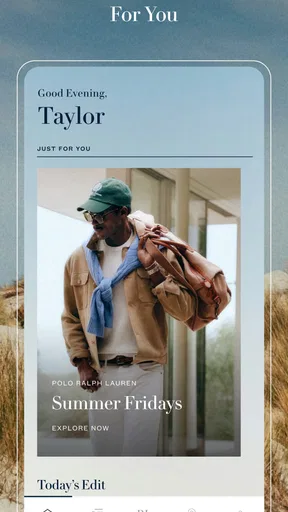
First things first, the interface is sleek and sophisticated, just like the brand itself. Navigating through the app is a breeze. The home screen greets you with a stunning display of the latest collections and trends. It feels like walking into a virtual Ralph Lauren store.
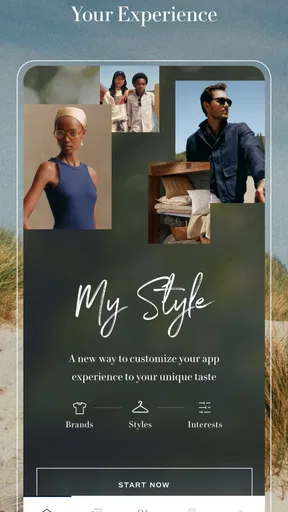
One of the coolest features is the personalized shopping experience. Upon signing up, you can input your style preferences, and the app curates selections just for you. Whether you're looking for a classic polo or something a bit more avant-garde, it's all at your fingertips.
Discovering the Collections
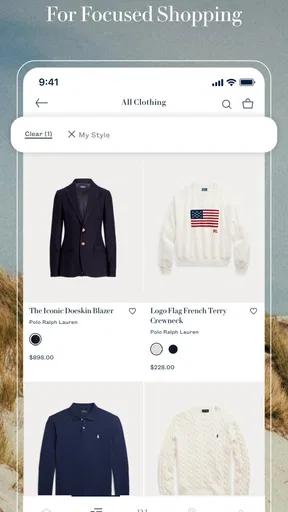
Ralph Lauren's app offers a deep dive into their vast collection. You can browse through categories like Men's, Women's, Kids, and even Home. Each section is meticulously organized, making it easy to find exactly what you need.
The product descriptions are detailed, with high-quality images that let you zoom in to see every stitch and detail. And for those who love a good deal, the app's sale section is a treasure trove of discounted luxury items.
Shopping Made Easy
Shopping on the Ralph Lauren: Luxury Shopping app is a seamless experience. Adding items to your cart is straightforward, and the checkout process is smooth. They offer multiple payment options, which is always a plus in my book.
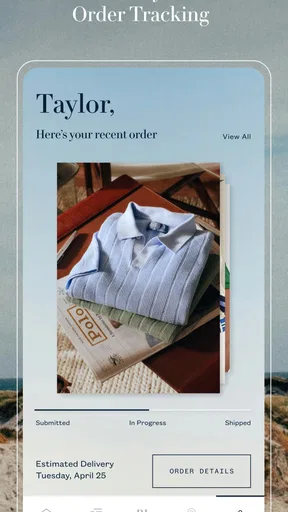
Shipping options are clearly outlined, and you get updates on your order's progress right in the app. They even have a section for customer service if you need to reach out for any reason.
Choosing what suits you, not just what looks good
For clothing, I would use the item description and close-up images to build a shortlist, then check the available size and the product details before committing. An image can help me judge design and color, but it cannot tell me exactly how a garment will feel or sit on my own body. If I’m uncertain between two pieces, I’d compare their descriptions and think about what I already wear most often. That is more useful than choosing solely because one photograph is styled more dramatically.
The same approach helps when shopping across the app’s different sections. A gift for a child, a home item, and something for my own wardrobe call for different checks, even if they appear in the same brand environment. I’d decide the recipient, intended use, and rough budget first, then browse the relevant category. This keeps a broad catalogue from turning into an aimless scroll and makes the app’s brand-specific organization work in my favor.
Stay Updated with Fashion Trends
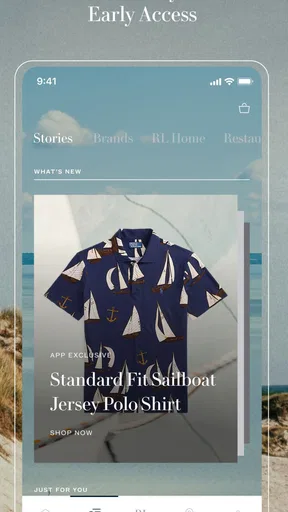
Another feature I love is the app's ability to keep you updated on the latest trends. You can sign up for notifications about new arrivals and exclusive launches. Plus, there’s a blog section with fashion tips and interviews with designers. It's like having a fashion magazine built right into the app.
When discovery helps—and when it gets in the way
That editorial side is most valuable to me when I’m looking for ideas rather than a particular item. I might browse the fashion content to get a sense of how pieces are presented, then switch to the shop with a more specific question in mind: do I need a versatile layer, a special-occasion outfit, or a gift? Moving from inspiration to a defined need is a useful way to keep browsing enjoyable without letting it become endless.
On the other hand, someone who wants a stripped-down tool for quickly buying a basic item may find trend content and brand storytelling unnecessary. A general retailer can be more convenient when the main job is comparing several labels, colors, and price points in one place. I see this app as a better fit for people who want to explore Ralph Lauren specifically, not as a replacement for every other way of shopping.
Personal Touch
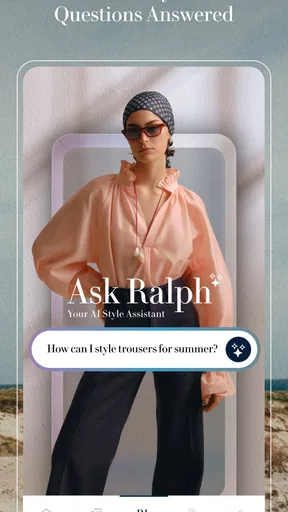
What sets this app apart is the personal touch. You can chat with a stylist directly through the app if you need advice on what to wear for a specific occasion. This feature makes it feel like you have a personal shopper with you at all times.
Getting more from a stylist conversation
If I were asking for styling help, I’d make the question concrete: describe the occasion, the level of formality, and the kind of pieces I already plan to wear. “What should I wear?” leaves a lot open; “I need a polished look for a daytime event and want to use these trousers” gives the conversation a practical starting point. I’d also treat a suggestion as guidance, not a substitute for checking the product’s details or deciding whether it fits my own taste.
This makes the stylist option most useful for someone who enjoys the label but wants help narrowing choices. If I already know exactly what I want, going directly to the relevant product is likely faster. If I need broad advice across many brands or want to compare a wide range of budgets, a multi-brand shopping service—or advice from someone who knows my wardrobe—may suit me better.
Who will get the most from it
The app is aimed at shoppers who are comfortable browsing within one designer’s world and value a polished, image-led way to do it. It can also suit someone buying a considered gift: the different shopping areas make it possible to explore more than clothing, while descriptions and product images help narrow the options. The key is to arrive with a reason to browse, even if that reason is simply inspiration.
I’d suggest skipping it if your priority is a broad cross-brand comparison, bargain hunting across many retailers, or a highly utilitarian purchase that does not call for the brand’s styling and presentation. A dedicated brand app can make discovery feel focused, but that focus is also its limit. The most useful comparison is not whether it replaces every fashion store; it is whether you want a direct route into Ralph Lauren’s own range rather than a mixed catalogue.
Practical checks before placing an order
Before checkout, I’d pause to confirm the selected item, size, quantity, and delivery details. That small review is worthwhile on any phone-based purchase, particularly when I’ve been browsing several similar products. If I’m buying for a deadline, I’d pay close attention to the delivery information shown for that order rather than assuming every item or destination follows the same schedule.
People often wonder whether they need an account to make browsing worthwhile. The app’s personalization is tied to signing up, so an account makes sense if tailored selections are valuable to you; if you mainly want to look around, you can decide whether that extra personalization is worth setting up. I’d also consider notifications separately from account use: alerts are optional in spirit, and there’s little reason to enable them if I don’t want ongoing brand updates.
Another common question is whether the app is suitable for a quick purchase while out and about. It can be convenient for checking an item or placing an order, but I’d reserve the final review for a moment when the connection is steady and I can read each choice carefully. For shoppers who prefer to inspect clothing physically before buying, a store visit remains the more reassuring option; the app is strongest when browsing convenience matters more than trying something on first.
Final Thoughts
Overall, the Ralph Lauren: Luxury Shopping app is a must-have for any fashion enthusiast. It combines the convenience of online shopping with the elegance of Ralph Lauren’s branding. The app is user-friendly, visually appealing, and packed with features that make shopping a pleasure.
If you love indulging in luxury fashion, downloading this app is a no-brainer. It’s not just about shopping; it’s about experiencing the world of Ralph Lauren in a whole new way. So, go ahead, give it a try, and let your style shine.
A measured recommendation
I’d call it a worthwhile companion for people who already enjoy Ralph Lauren and want a convenient, brand-focused way to browse, compare, and shop. It has a strong visual identity and useful routes from discovery to purchase, while its connected nature and single-brand focus make it less suited to every situation. I’d keep a broader retailer handy for cross-brand comparisons and use this app when the brand itself is what I’m looking for.
Ralph Lauren Corp’s shopping app is free, rated for Everyone, and has a 4.7 average from around 4,600 ratings, with more than a million installs. It was released on November 8, 2021; version 4.3.6 requires Android 10 or newer. Those details make it an accessible option for many Android shoppers, while the real deciding factor for me is whether its focused catalogue and connected browsing style match the way I like to shop.
Pros
- Elegant and user-friendly interface.
- Exclusive offers for app users.
- Seamless checkout process.
- Extensive product details and images.
- Personalized recommendations.
Cons
- Limited customer support options.
- Occasional app crashes reported.
- High data usage for browsing.
- Requires frequent updates.
- Limited offline functionality.
FAQs for Ralph Lauren: Luxury Shopping
What features does the Ralph Lauren app offer?
The Ralph Lauren app offers a seamless shopping experience featuring the latest collections and exclusive products. Users can browse and purchase luxury clothing, accessories, and home decor. The app also includes a virtual wardrobe for outfit planning, personalized recommendations, and access to styling tips and fashion news. Additionally, it provides a streamlined checkout process and order tracking.
Is the Ralph Lauren app free to download and use?
Yes, the Ralph Lauren app is free to download on both Android and iOS platforms. While the app itself does not require any purchase, users will need to spend money on any items they wish to buy. However, the app provides various features and content at no cost, such as fashion news and styling tips.
How secure is the Ralph Lauren app for online shopping?
The Ralph Lauren app employs advanced security measures to ensure safe shopping. It uses encryption and secure payment gateways to protect users' financial information. Additionally, the app requires users to set up an account with a secure password. Regular updates are also implemented to maintain the highest security standards and protect against potential vulnerabilities.
Can I track my orders through the Ralph Lauren app?
Yes, the Ralph Lauren app allows users to track their orders easily. Once a purchase is made, the app provides real-time tracking updates, so you can monitor the status of your shipment. Notifications are sent to keep you informed of any changes or delays, ensuring that you are always up-to-date with your order.
Are there any exclusive offers available on the Ralph Lauren app?
The Ralph Lauren app often features exclusive offers and early access to new collections for its users. By enabling notifications, you can stay informed about special promotions, discounts, and limited-time deals. Additionally, app users may receive personalized recommendations and styling tips tailored to their shopping preferences, enhancing their overall experience.


